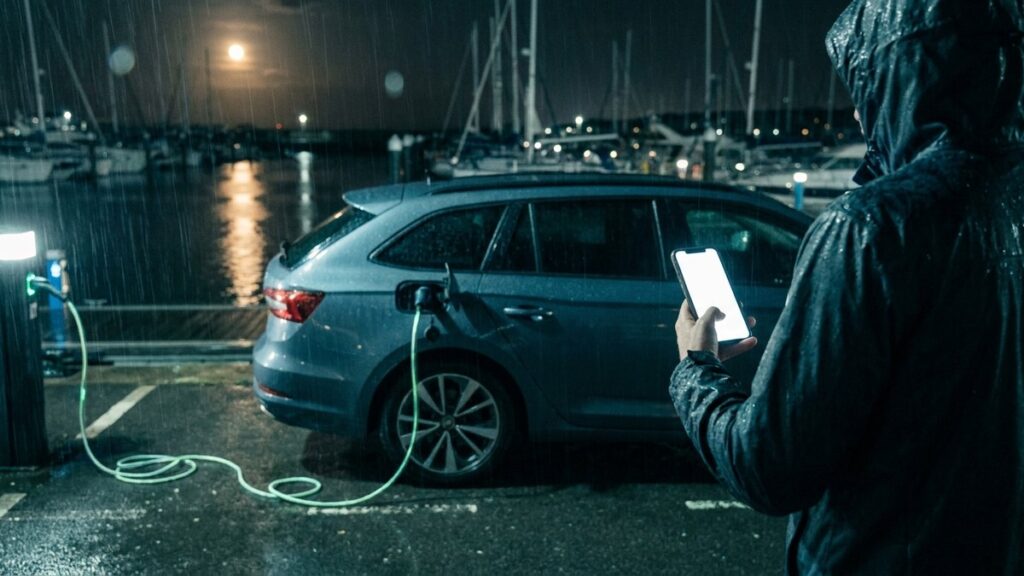
Picture the moment most charge-tracking actually happens. It is eleven o’clock at night, it is raining, and you are standing between the car and the charge point with the cable in one hand and your phone in the other. The charge has finished, the number you need is on the screen in front of you, and you have roughly ten seconds of patience for admin before you get back in the car. This is the moment Amperlo’s Quick Log was designed for — not the tidy version where you sit down at a desk later and try to remember what the meter said.
One tap from anywhere
Quick Log lives behind the “+” button in the bottom navigation, so it is reachable from the Dashboard, Sessions, or anywhere else in the app without hunting through menus. Tap it and you get three choices: log a charge, log a meter reading, or log an odometer reading. Each flow asks for the minimum it actually needs and nothing more. There is no ceremony, no wizard, and no required field you will resent at midnight. Anything you skip can be tidied up later from the Sessions page, on a proper screen, with dry hands.
That split into three entry types matters more than it looks. A charge, a meter reading, and a mileage figure arrive at different moments in real life — you read the meter when you plug in, you notice the odometer when you park, the receipt turns up the next morning. Quick Log lets you capture each one the moment you have it, rather than forcing you to assemble a complete record in one sitting.
The “Marina overnight” preset
Amperlo grew out of a very specific routine: a car that charges overnight on a marina’s prepaid shore-power meter, driven home in the small hours. For that case there is a one-tap preset. “Marina overnight” pre-fills the source as marina and the date as yesterday, so the whole entry is two taps and a number.
The “yesterday” part is doing more work than it appears to. Amperlo treats anything logged before 4am as belonging to the previous day, because a car that gets driven until 3am belongs, for accounting purposes, to the evening before — not to a fresh calendar date that started while you were on the motorway. A midnight cut-off would quietly split one night’s driving and charging across two days and skew every daily figure derived from it. The 4am convention keeps late nights attached to the right day without you ever thinking about it.
Built for thumbs, not cursors
Every interactive element in Quick Log is sized for a thumb: tap targets are at least 44 pixels, and the primary inputs — the ones you actually type numbers into — are larger still, 60 pixels and up. That is the difference between hitting the field first time and stabbing at your phone three times with a cold, wet thumb while the cable drips on your shoes.
The app is dark by default, which sounds like a fashion choice until you use it outdoors at night. A white screen at a dark pontoon or an unlit car park is genuinely unpleasant; a dark one lets you read the interface and the meter without your eyes fighting both. And destructive actions — deleting an entry, for instance — use swipe-to-confirm rather than a small “are you sure?” button, precisely because one-handed use makes accidental taps more likely, not less.
Point the camera at the meter
The marina’s prepaid meter counts down the kWh remaining on the card, and the honest answer to “what did it say?” is often “I’ll have forgotten by the time I’m back at the car.” So the meter-reading flow has a camera shortcut: photograph the display and the picture is attached to the reading. You get the number captured in the moment and the photograph as evidence if a figure ever looks wrong later. Transcribe it on the spot or check it against the photo the next day — either way, the reading is real, not reconstructed.
No signal? No problem
Car parks, underground charge points, and marina pontoons share one trait: dreadful mobile signal. Quick Log keeps what you have entered in the browser’s local storage, so a dropped connection does not eat your entry. Type the number, hit save, and if the request cannot get through right away, nothing is lost — your input survives until the connection does. The worst-case outcome is a short wait, never re-typing a figure you no longer remember.
Fast entry, honest numbers
None of this is decoration. Amperlo’s whole premise is that your cost-per-mile figure is only as good as the log behind it, and the log is only as good as it is easy to keep. Every charge you skip because the form was fiddly is a gap in the data; every gap nudges the Dashboard’s numbers away from the truth. Quick Log exists so that the lazy path and the accurate path are the same path.
Everything you capture flows straight into the rest of the app. The charge appears in Sessions, the meter reading updates your prepaid block’s remaining balance and burn rate, the odometer reading feeds the cost-per-mile calculation on the Dashboard and the efficiency figures in Analytics. A ten-second entry at the charger is the entire data-entry burden; the arithmetic is Amperlo’s job.
Free, for one vehicle, forever
Quick Log is part of Amperlo’s free tier, alongside the Dashboard, charging sessions, meter and odometer readings, and trip CSV import — one vehicle, tracked end to end, no card required. The paid plan adds AI receipt parsing, email intake, Trips, and the maintenance ledger, but the core habit this article describes costs nothing.
If your current system is a notes app, a spreadsheet, or good intentions, try the ten-second version. Sign up free at amperlo.com and log your next charge before you have even unplugged.
